Follow these steps
Define the identifier
Choose a consistent internal SKU such as
SKU-00125. Avoid putting a description paragraph into a linear barcode. Use separate label text for the product name.Select Code 128
Open the generator, choose Code 128 and enter the exact ASCII identifier. Keep Hindi or other non-ASCII product names outside the encoded value; the Hindi label tool can print them as label text.
Compare image and decoded text
Download the SVG or PNG. Scan a trial label into a plain text field and compare characters, case, hyphens and leading zeros with your inventory record.
Prepare a batch
Once the format works, use the bulk generator for your product list, or the sequential tool for an agreed internal numbering sequence.
A real sample to compare
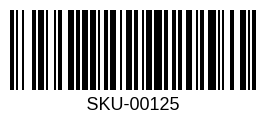
SKU-00125. It is not a retail GTIN.Other possible stock identifiers are BIN-A03 and ASSET-00042. Give each value a defined meaning in the receiving system; the image generator does not create inventory records.
Code 128 and GS1-128
Ordinary Code 128 carries your chosen data. GS1-128 adds GS1 structure, including application identifiers and FNC1 handling. For batch, expiry and GTIN fields in a GS1 workflow, use the GS1 builder instead of typing displayed parentheses into an ordinary Code 128 field.
Common questions
Do I need to add the barcode symbol checksum by hand?
The encoder handles the symbol checksum. That is separate from a retail GTIN check digit.
Will scanning this code show the price?
Only if the receiving software has a record connecting the identifier to a price. The sample barcode contains the SKU text.